Products and pricing

One plan, everything a professional forwarder needs

Every plan is the full ERP: the web app in any browser, and the desktop ERP on Windows for the complete stack. Digital Forwarder gives your team two users, its own Client Portal and live carrier data for one country, all for one monthly price. Billed monthly in euros, on a 12-month agreement.

Start your free trial 14 days free · then choose a plan
  1. Request your accountYour company's name, country and contact. A few minutes.
  2. We approve itWe check every new company before it gets access.
  3. Start in minutesOnce approved, start straight away in the web app, or download the desktop ERP for the full stack. No setup project, no weeks of waiting.
14 days free No setup fees Annual agreement, billed monthly Hosted in the EU

Pay per user

Flex

The full ERP per named user. Add the rest when you need it.

€ 95per user / month

Pay only for the people who work in it

Web app Desktop ERP
  • Quick Quote and the order ticket: request to delivery, with shipment modes, services, vendor orders, Master and House B/Ls, MAWB and HAWB, invoices and statements of account
  • Consol orders for Ocean FCL and Air: single orders in one booking, with buy, sell, P&L and fill
  • Import/Export Licence Service: licence tickets from request to every shipment written off, with AI e-mail replies to your client
  • Rate Contracts and Rate Templates, with the Excel Add-in
  • Forwarder rates Desktop: the vendor invoices you pick, read by AI into buy, sell and margin per charge and linked to your rate contracts
  • Forwarder Alliance: your partner forwarders and the lanes you price for them, and 5 of them free in the web app
  • AI agents in Quick Quote and Order: a client's e-mail read into a new quote or order, and precise replies to clients and vendors about an order's status
  • Auto status and Track & Trace Desktop: service status e-mails to your clients for every order and shipment; plus Rate Publisher and Quote Auto Send
  • Add when you need them: Client Portal € 250, Carrier Data € 350 per base country
Start 14-day free trial

Then € 95 per user a month

For several offices and countries

Multi-Office

Five users, the Client Portal and carrier data for three countries.

€ 1.150/ month

€ 1.775 separately Save € 625 a month

Web app Desktop ERP
  • 5 users included, more at € 85 each
  • Your own Client Portal: quotes, bookings and tracking for your clients
  • Carrier Data for up to 3 base countries Desktop: rates and schedules from the carriers, more countries at € 350
  • 20 forwarding partners free in the web app, then packs of 20 for € 100
  • Everything in Flex
5 User Licences€ 475
Client Portal€ 250
Carrier Data, 3 countries€ 1.050
Separately€ 1.775
Multi-Office€ 1.150

14-day free trial·Annual agreement, billed monthly·No setup fee

Try everything free for 14 days. When you subscribe, you start a 12-month agreement with convenient monthly billing, and you can add users or base countries at any time.

Prefer to pay for the year up front? Get one month free: Flex € 1.045 per user, Digital Forwarder € 6.490, Multi-Office € 12.650 a year. Ask us.

AI Credits on any plan: € 50 a month with 3,000 credits for the AI e-mail agents, forwarder rates and translation; packs from € 25 when you need more. AI Credits →

Already a client? Choose a plan or add any part under My account. For businesses only. Subscribing means you accept our Terms of service.

One licence, two ways in

Every user on every plan gets both, at no extra cost. Open the ERP anywhere in the browser; run the complete stack, with everything that works for you through the day, on the desktop.

Web appapp.logistics-erp.com · any browser

Your ERP wherever you are, with nothing to install:

  • On a tablet, a Mac, a laptop at home or a second office's PC
  • Rates, schedules and rate templates, and Quick Quotes priced with your rates
  • Orders, licences, invoices and statements of account
  • Quote and order reports e-mailed from your own mailbox

Desktop ERPWindows · the complete stack

Every module, plus the automation that runs from your office:

  • Carrier Data Fetcher: rates and schedules with your own carrier logins
  • Track & Trace through the day, and Auto status e-mails to your clients
  • Forwarder rates: vendor invoices from your company folders and mailboxes, read by AI
  • Quote Auto Send, re-priced with today's rates on every send
  • AI e-mail agents on your order and licence e-mails
One passkey loginSame company and dataNo extra cost
Web app and desktop compared

Keep your own rate templates. Make them live. Desktop

Many forwarders price in their own Excel rate templates, and they can keep doing so. The Excel Add-in keeps your sheets exactly as they are and adds what Excel alone can't: live prices from the rate engine, your margins and client discounts, and professional quote reports in a few clicks.

See it at work: Excel Add-in
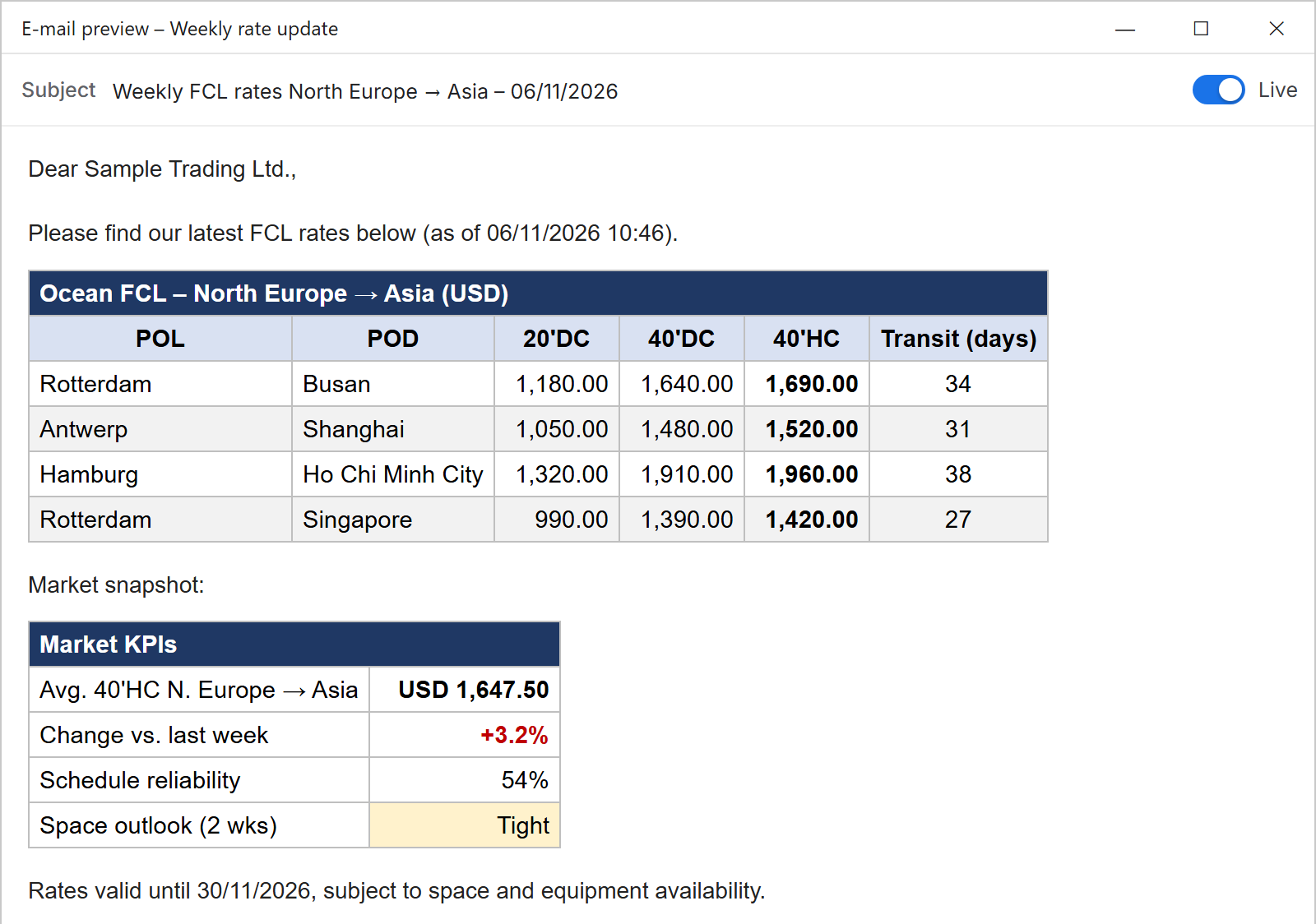
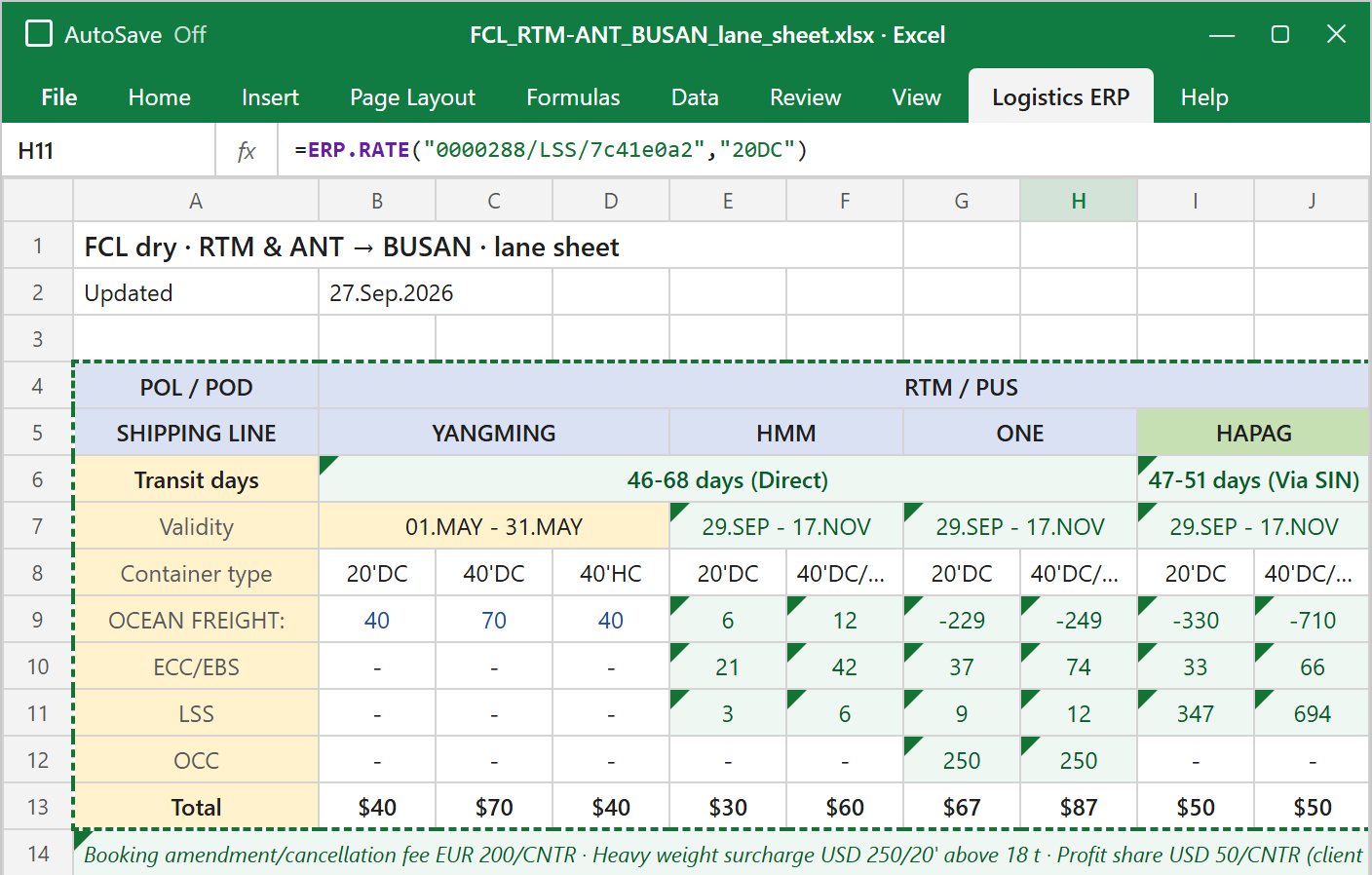
An Excel lane sheet, Rotterdam and Antwerp to Busan, with four carriers' FCL rates; the fetched rates are cells linked to the rate records in Logistics ERP An e-mail report made by the Excel add-in: weekly FCL rates from North Europe to Asia for Sample Trading Ltd., as formatted tables with a market snapshot
  1. Keep your own templatesYour rate sheets, zone tables and formulas stay as they are: nothing to import or rebuild.
  2. Live pricesLink a cell to a rate in the ERP: it updates by itself when the rate changes, and so do your exchange rates.
  3. Margins and client discountsA linked cell shows the buy rate, margin, client discount or sell price for the client you choose, set once in the rate engine.
  4. Professional quote reportsPick ranges of your sheet and add text, preview the report and e-mail it to your client, straight from Excel.

The order ticket, from request to delivery

One window per order, on every plan. Every step, service, vendor and invoice of the shipment is in it, and so are the agents.

See it at work: Order Flow
Order details
Client, parties, references and dates
Shipment request
Cargo, containers and route, read from the client's e-mail by the AI agent
Shipment modes
The ways to ship it, priced from your rate templates
Offers
The offers you sent and the one the client chose
Payment
Charges and invoices: open, debit and credit; draft, posted and paid
Services
Carrier, truck, customs and warehouse, each with its own status and documents. The bills are made here: Master B/L and House B/Ls for ocean, MAWB and HAWBs for air
Vendor Orders
What you order from each vendor, and their invoices
AI Email Agent and Auto status
Precise replies to clients and vendors, and status e-mails to your client Desktop

Consol orders, Ocean FCL and Air

Put your clients' single orders into one container or one air booking. The consol shows what you buy, what you sell and how full it is, before you book.

See it at work: Order Flow
Booking setup
The single orders, their shipment data and services, and an overview of buy, sell and fill
One booking
Booked once with the carrier or airline; Cancel booking from the same screen
Lock prices
Buy, sell and P&L in EUR in the window's header; lock them once agreed
Bills
Master B/L or MAWB, and House B/Ls or HAWBs, under Services

AI agents inside Quick Quote and Order

Built into the screens your team already works in, on every plan. The agents read and draft; your operator checks and sends. AI work uses AI Credits; Auto status uses none.

See it at work: AI Agents
AI agent · Quick Quote and Order

From the client's e-mail to a quote

  1. Drop the e-mail, PDF or text of a request
  2. Cargo, containers and route are read and shown next to what the record holds
  3. Correct what you want, then create the Quick Quote or the order
AI Email Agent · Order

Precise answers about an order's status

  1. To your client: where the shipment is, drafted from the order's own services, schedule, B/Ls and invoices
  2. To your vendor: a reply about their own service on the order, and their update turned into a service update you check
  3. Each e-mail is linked to its order by the order's numbers, so the facts are always that order's
Auto status · OrderDesktop

Your client hears first, not last

  1. Every one or two hours, each service is checked and the carrier asked
  2. When something changed, the client gets a service status e-mail from your mailbox
  3. Plus a status e-mail at the times you set for each order

Which plan costs you least?

Tell us what your office needs. The prices are monthly, excluding VAT.

Flex

€ 790 2 × € 95 + Client Portal € 250 + 1 × € 350

Digital ForwarderLowest for you

€ 590 € 590 with 2 users, the portal and 1 country

Multi-Office

€ 1.150 € 1.150 with 5 users, the portal and 3 countries

Digital Forwarder saves you € 200 a month against buying the parts.

Compare the plans

Every plan is the same ERP. They differ in how many users, portals and countries the price includes.

Flex€ 95 per user / month Digital Forwarder€ 590 / month Multi-Office€ 1.150 / month
UsersPer user, € 952 included, then € 95 each5 included, then € 85 each
The ERP, in every plan
Web app, desktop ERP and Excel Add-inThe Excel Add-in is a product of its own, inside Excel on WindowsIncludedIncludedIncluded
Quoting and ratesQuick Quote, Rate Contracts and Rate Templates with a margin per rate and discounts per client; truck by zone, city or distance; Rate Publisher, Quote Auto SendIncludedIncludedIncluded
The order ticketRequest, offers, booking, in transit, delivered; shipment modes, services, vendor orders, Master and House B/Ls, MAWB and HAWB, invoices and paymentIncludedIncludedIncluded
Consol ordersOcean FCL and Air: single orders in one booking, with buy, sell, P&L and container fillIncludedIncludedIncluded
Import/Export Licence ServiceOne licence ticket, step by step: request, goods, requirements, screening, documents, submission, authority queries, the licence and every shipment written off against it. Client e-mails linked to the ticket, with AI reply drafts and ticket updatesIncludedAI e-mails use AI CreditsIncludedAI e-mails use AI CreditsIncludedAI e-mails use AI Credits
Quick Quote and Order, with AI agents built in
AI agent in Quick Quote and OrderDrop or paste the client's e-mail: cargo, containers and route read into a new quote or orderIncludeduses AI CreditsIncludeduses AI CreditsIncludeduses AI Credits
AI Email Agent on the orderPrecise replies to clients and vendors about an order's status, drafted from its services, schedule, B/Ls and invoices; a vendor's update becomes a service update you checkIncludeduses AI CreditsIncludeduses AI CreditsIncludeduses AI Credits
Auto status for ordersDesktopEvery service checked, the carrier asked, and a status e-mail to your client when something changed and at the times you setIncludedIncludedIncluded
Track & Trace and Auto status for shipmentsDesktopOcean and air carriers checked through the dayIncludedIncludedIncluded
Rates and partners
Forwarder ratesDesktopVendor invoices you pick, read by AI into buy, sell and margin per charge and linked to your rate contracts; the reading uses AI CreditsIncludedIncludedIncluded
Forwarder AllianceYour partner forwarders and the lanes you price for themIncludedIncludedIncluded
For the company
Client PortalYour own quote, booking and tracking site+ € 250 / monthIncludedIncluded
Carrier Data Service DesktopRates and schedules from the carriers, per base country, fetched by the desktop ERP with your own carrier logins+ € 350 per country1 country included, then € 3503 countries included, then € 350
Free web-app logins for partnersPartners without their own licence5 free; 20 with the Client Portal20 free, then € 100 per 2020 free, then € 100 per 20
AI CreditsAI e-mail agents, forwarder rates and translation+ € 50 / month+ € 50 / month+ € 50 / month
Free trial14 days14 days14 days
All features of the User Licence (the ERP in every plan · 58 features in 9 areas)

Sales and CRM

  • Companies and contacts. Clients, carriers, agents and vendors in one register, with their contacts, addresses and company type.
  • Prospects. Leads followed up to their first quote, with the history kept on the company.
  • Quick Quote. A shipment request priced in minutes on your own rates, with a quote per carrier and mode.
  • Incoterm pricing. For forwarder clients the Incoterm decides which legs are priced, on the buyer's or the seller's side.
  • Quote reports by e-mail. A branded quote report sent to the client from your own mailbox.
  • Quote Auto Send. Each client's quote re-priced with today's rates and sent again on your schedule, until they book.
  • Quote templates. Reusable layouts and conditions, so every quote leaves in the same shape.

Rates and pricing

  • Rate Contracts. Ocean FCL and LCL, air, truck, customs, warehouse and insurance in one engine, each with its validity.
  • Every charge on its own basis. Per container, per CBM, per W/M, per kg or per shipment, with weight and volume breaks, minimums and a percentage of the basic charge.
  • Truck prices your way. By zone, by city or by distance in kilometres or miles, plus carrier haulage.
  • Buy, margin and sell. A margin on every rate line, so each quote starts from what you pay and shows what you earn.
  • Client discounts. A discount per client on the contract, applied the same way in every quote, order and linked Excel sheet.
  • Rate templates. A lane set up once, door to door, from your rate contracts: when a rate changes, every quote on that lane follows. They price Quick Quote, orders, the Client Portal and the Excel Add-in.
  • Charge codes and currencies. One charge code list and your exchange rates for quotes, orders and invoices.
  • Forwarder Rate Fetcher. AI reads your partners' invoices: buy, sell and margin per charge and shipment, each charge linked to its surcharge in a rate contract. The reading uses AI Credits.
  • Rate Publisher. Weekly branded rate reports to clients and prospects, from your routes and carrier rates, that bring in new quote requests.
  • Scheduled publishing. Each client group gets its report weekly or monthly, sent from the cloud through your SendGrid account.
  • Ports and vessel schedules. Port list and sailings to choose from, with schedule reports e-mailed to client groups.

Orders and operations

  • One order from request to invoice. Shipment request, offers, booking, services, charges and invoices on one record.
  • Offers in several modes. Ocean, air and road offers side by side on one order; the client chooses one.
  • Service windows. Truck, warehouse, customs and carrier services, each with its own vendor, status and documents.
  • Consol orders. LCL and air consolidations with their house shipments and one master.
  • Timing rules and next actions. Cut-offs, departure and arrival drive each order's to-do list, per mode.
  • Order timeline. Every step and change on the order in date order.
  • DEM/DET clocks. Free time, the start of demurrage and detention, and the estimated cost per container.
  • Order list and dashboard. Status view with a side panel, and an urgent list of overdue orders and expiring licences.
  • Forwarder Alliance. One order ticket shared with your overseas partner, who works with you in the Logistics ERP web app.

Tracking and client updates

  • Track & Trace. Container, B/L, booking or air waybill numbers checked with ocean carriers, airlines and express couriers.
  • Carrier service tracking. Vessel, legs and milestones shown on the order's carrier service.
  • Auto status. Scheduled checks, and an e-mail to the client only when the status has changed.
  • Status reports at set times. A status e-mail to the client at the times you choose, from the operator's mailbox.
  • Shared tracking records. The team sees the same shipments; the operator's PC does the checking.

Bills of lading and documents

  • Bills of lading. House B/L, FCL sub-master and FCL and LCL master bills as PDF, with the release type.
  • Invoice documents. Your logo and layout, with the bank account chosen from up to five.
  • Order and quote reports. Booking confirmations, status reports and quotes, generated from the record.
  • E-mail and text templates. Pre-alerts, arrival notices and standard texts with merge fields from the order.
  • Documents on the order. PDFs and linked e-mails stored with the order and its services.

Import and export licences

  • Licence tickets. One ticket per licence, from request to approval.
  • Document checklist. What the client still has to send, ticked off on the ticket.
  • Write-off per shipment. Every shipment booked against the licence, with the balance left.
  • Expiry warnings. Licences about to expire stand out on the dashboard.
  • E-mails on the ticket. Mail about a licence is linked to its ticket by the licence number in the subject.

Invoicing and accounting

  • AR and AP invoices. Sales and purchase invoices made from the order's charges, in any currency.
  • VAT codes. Your VAT rates, set once and applied per charge.
  • Statement of account. AR and AP per company, paid and open, with overdue and due-soon alerts.
  • Aging view. Open amounts per company by days until due.
  • Payment schedules. One schedule across several invoices, with the paid amounts back on each invoice.
  • Numbering series. Your own number format per document, type and mode, never handed out twice.

E-mail

  • Your own mailboxes. Microsoft 365 and other accounts; quotes, reports and status mails leave from your address.
  • Mailbox in the ERP. Client mail read and answered next to the orders it is about.
  • E-mails on the order. Client and vendor mail linked to the order the operator handles.
  • Per named user. Each user has their own accounts and sign-in, so nobody sends from someone else's mailbox.

Excel Add-in

  • Keep your own spreadsheets. Your rate sheets, zone tables and formulas stay exactly as they are: nothing to import or rebuild.
  • Link a cell to a rate. Drag a rate from the panel into any cell: it shows the buy rate, margin, client discount or sell price, live from the rate engine.
  • One place for margins and discounts. Change a margin or a client's discount in the ERP, and every linked sheet shows the new price.
  • Exchange rates linked too. Your ERP's exchange rates in any cell, the same as in your quotes and invoices.
  • Quote compare per carrier. One shipment priced across carriers in the sheet.
  • Professional quote reports. Pick ranges of your sheet and add text, preview the report and e-mail it to your client, straight from Excel.
All features of the Client Portal Licence (49 features in 8 areas)

Brand and access

  • Your own subdomain and logo. Clients see your company name and brand on every page.
  • Online sign-up. New clients ask for access on your portal; the request lands in your ERP.
  • Passkey sign-in. Clients sign in with fingerprint, face or device PIN, with their password as a fallback.
  • Clients invite their colleagues. Name and e-mail is enough; each colleague sets their own password.
  • One company account. Every member sees the company's quotes, orders, licences and invoices.
  • Company type. Clients say whether they are a forwarder, shipper or consignee, which decides how they are priced.

Quick quotes

  • Prices straight away. Freight, port and airport charges, trucking, customs and insurance from your rate sheets.
  • Sea and air side by side. FCL, LCL and air in one list, with Best value, Cheapest and Fastest marked.
  • Transit times and departures. Shown with every price.
  • Incoterm pricing. Forwarder clients are priced on their customer's side of the Incoterm.
  • Prices update while editing. Change the route or the load and the prices follow; the portal says what is still missing.
  • AI agent. Paste an e-mail or drop an e-mail, PDF or text file; every value is checked before saving.
  • Saved quotes. Quick quotes stay for next time and become an order with one click.

Offers and booking

  • Order request. From a quick quote or from scratch, with every rate sent along and the client's preference marked.
  • Your firm offers. Main and optional offers, with the price breakdown at origin, freight and destination.
  • Sailings. Departure and arrival, vessel and voyage, transit time and transhipments per offer.
  • Booking request. The client picks an offer and a sailing; until you confirm they can still switch.
  • Six clear stages. Waiting for offers to Completed, with a "Next step" column and the client's moves highlighted.
  • E-mail when offers are ready. Clients do not have to check the portal to know it is their turn.
  • Edit or cancel. Clients change the request before booking, and cancel as long as no invoice is posted.

Following the shipment

  • Booking ticket. Carrier, sailing, departure, arrival and the booked price.
  • Services. Trucking, customs, terminal and freight, each with its handlings, remarks and documents.
  • In transit and ETA. Shown on the order and in the list once the sailing has left.
  • Document upload. Shipping instructions and commercial invoices as PDF, Office files or images up to 20 MB.
  • Payment per order. What is charged, invoiced and due, per currency, with each invoice to download.
  • Chat with your team. A chat on every order and licence, answered from the ERP.

Import and export licences

  • Request in five steps. Trade lane, goods, parties, documents and review, saved at every step.
  • Licence check. Your specialists classify the goods and screen the parties, or issue a "No license required" report.
  • Document checklist. What is still needed, uploaded by the client and accepted by you.
  • Seven-stage tracker. From Received through With the authority and Decision to License in use.
  • Authority questions. Marked "Action needed" with the deadline, answered with files in the portal.
  • Licence balance. Used, reserved and available per product after every shipment.
  • Alerts. When 80% of the licence is used and 30 days before it expires.

Invoices

  • All invoices together. Every order and licence invoice, each linked to what it covers.
  • Clear statuses. Open, Partially paid, Overdue, Paid, Offered and Cancelled.
  • Balance due. Net, VAT, total, paid and still to pay, with a total per currency.
  • Due-date warnings. Invoices due within a week or overdue stand out.
  • PDF download. The invoice with your bank details, ready to pay.

Run from your ERP

  • One set of data. Rates, clients, orders, licences and invoices come from the ERP; nothing is typed twice.
  • Requests become orders. A client's order request arrives in the ERP within seconds, ready for offers.
  • Client set-up in four steps. Review the request, add the first user, link or create the company, send the invitation.
  • Client users. Invite, edit, block, unblock and send a new password link from the ERP.
  • Disconnect a client. Every user of that client is blocked at once, and can be connected again later.
  • Chat from the lists. Reply to client chat from the order and licence lists without opening the record.

Partner alliance

  • Partners' rates in your portal. Overseas partners' own rates for lanes from or to their country, priced next to yours.
  • Never pooled. Each price row names its partner, and the partner's rates stay in the partner's ERP.
  • Straight to the partner. An order on a partner's price also reaches the partner's ERP, and it stays your order.
  • Switch a partner off. Disabled partners disappear from new quotes; their past quotes, orders and invoices stay visible.
  • Partners in the web app. Your partners work the shared orders, quotes and licence tickets in the Logistics ERP web app: the first 20 free, then packs of 20 for €100 a month.

Add more whenever you need it

Start with one plan and grow from there. Your administrator adds these on any plan, at any time. Each one is billed monthly with the rest of your plan.

A colleague € 95 a month € 85 on Multi-Office. Colleagues are added under My account; this licenses you.
The Client Portal € 250 a month Included in Digital Forwarder and Multi-Office
A country of carrier data € 350 a month Fetched by the desktop ERP Desktop
AI Credits € 50 a month 3,000 credits a month; packs below

AI Credits packs

Top up the plan when its 3,000 monthly credits are not enough. A pack is paid once, is added as soon as the payment is confirmed, and stays valid for 12 months. The plan's own credits are used first.

2,500 credits

€ 25

€ 0,0100 per credit · valid 12 months

10,000 credits

€ 90

€ 0,0090 per credit · valid 12 months

50,000 credits

€ 400

€ 0,0080 per credit · valid 12 months

200,000 credits

€ 1.400

€ 0,0070 per credit · valid 12 months

Questions before you subscribe

Which plan is right for my team?

With one or two people and no Client Portal yet, Flex: you pay € 95 per user and add the rest later. As soon as you want your own Client Portal and live carrier rates, Digital Forwarder costs less than buying the parts: two users, the portal and one base country come to € 790 separately and € 590 in the plan. The calculator works it out for your office.

What are the contract terms?

Every plan starts with a 14-day free trial and has no setup fee. When the trial ends, each subscription runs on a 12-month agreement, billed per month, and renews for another 12 months unless you cancel it under My account; it then ends at the end of its term. Something you add later, such as a colleague or a country, has its own 12 months. Prefer to pay for the year up front? Write to us: you get one month free. The Terms of service say it in full.

Is there a free trial?

Yes, 14 days on every plan, once per product for each company and once for each user's licence. Your card is taken at checkout and charged when the trial ends, unless you cancel before then; cancelling in the trial ends it without a charge and without a term. AI Credits has no trial, because its credits come with a paid month.

Are the users in a plan named users?

Yes. Each licence belongs to one person, who signs in with their own passkey on the desktop ERP and the web app. We set your plan's licences up for the people you name, and you add more people at the plan's user price.

Can I change plans later?

Yes. Move to a bigger plan when you grow: your users, rates, orders and Client Portal stay as they are. Write to us and we switch it.

Can I use Logistics ERP in a browser?

Yes. Your User Licence covers both the desktop ERP for Windows and the Logistics ERP web app in any browser: one login, the same company and the same data. Sign in at app.logistics-erp.com on a tablet, a Mac or any computer where the desktop ERP isn't installed.

The desktop ERP is the office workstation and has every feature. It fetches carrier rates and schedules and checks Track & Trace with your company's own carrier logins, sends clients their order and shipment status at set times from your mailbox, and works with your Outlook or Microsoft 365 mailbox, the Excel Add-in and the E-mail module with its AI agents. That work needs a PC in your office, so it stays in the desktop ERP, and everyone sees its results in the web app too. Desktop and web app compared.

What is a base country?

The country whose lanes the Carrier Data Service fetches: every route that starts or ends there. With the Netherlands, Rotterdam to Shanghai and Shanghai to Rotterdam are fetched; Antwerp to Shanghai is not. Most single-office forwarders need one, which Digital Forwarder includes. Each further country is a subscription of its own at € 350 a month, added under My account; a chosen country stays fixed.

How do the free forwarding partners work?

Up to 5 forwarding partners from your own company list use the Logistics ERP web app free of charge, on every plan: shared orders, rate templates, quotes, invoices and statements of account. With the Client Portal, which Digital Forwarder and Multi-Office include, that becomes 20. Above that, add packs of 20 partners for € 100 a month.

How do I license more users?

Your company account or an administrator adds colleagues under My account and buys a licence for each of them there. A licence belongs to one named user, and there is no pool of seats to share.

What happens if a payment fails?

The products on that subscription are blocked straight away, and Logistics ERP opens only to say why. Stripe e-mails you a link to update the card; once the open invoice is paid, access returns within a minute. Stripe also tries the card again over the following days.

What happens when the AI credits run out?

The plan's 3,000 credits are used first and lapse at the end of the month. When you need more, buy a pack: it stays valid for 12 months. Your administrator sets a monthly limit and follows usage under My account.

Do my clients pay for the Client Portal?

No. Your clients use the portal free of charge, with as many logins as you give them. Your company pays one flat monthly price.

How is VAT handled?

Prices exclude VAT. EU business customers supply a VAT number during checkout and are invoiced under the reverse-charge rules.
Something else? Send us a message or ask for a bespoke arrangement.

× Something went wrong. Reload the page to carry on.

Rejoining the server...

Rejoin failed... trying again in seconds.

Failed to rejoin.
Please retry or reload the page.

The session has been paused by the server.

Failed to resume the session.
Please retry or reload the page.