Sales leads for freight forwarders: Quote Auto Send and Rate Publisher

Every quote keeps selling. Until the client books.

Your client asked for a price. Quote Auto Send prices that exact door-to-door request again with today's rates and sends it from your own mailbox, on the schedule you choose. Your offer stays in front of the client at the moment they decide.

Re-priced on every sendDaily, weekly or monthly"When changed": only when prices moveIn the User Licence
Quote 0000299 · Sample Trading Ltd.Netherlands → Korea · door to door · 1 × 20' + 1 × 40'
Auto send · Weekly · Fri 09:00
  1. 1
    Fri 13 Nov · sent4 offers · valid until 20 Nov
    € 654.78first price
  2. 2
    Fri 20 Nov · re-priced and sentCarrier rate lowered · valid until 27 Nov
    € 631.40− € 23.38
  3. 3
    Fri 27 Nov · no price change"Only when prices change": not sent
    € 631.40skipped
  4. ✓
    Mon 30 Nov · the client booksThe offer they had in their inbox
    Bookedorder created
Two sales-lead engines

Rate Publisher brings clients in. Quote Auto Send wins the shipment.

Both send your prices on a schedule, from your ERP and your rate templates. They work at different moments of the sale: one starts the conversation with many, the other keeps one client's decision warm.

Attract · top of the funnel

Rate Publisher

Branded rate reports with your lane prices, sent to your clients and prospects, every week.

Goal
Get noticed and start conversations
Who
Lists of clients and prospects
What
Lane prices per carrier, as a rate report
Priced on
Your rate templates, per lane, in general
Lead you get
A reply or a quote request: "price this for me"
1 → many one report, your whole list
Convert · bottom of the funnel

Quote Auto Send

The client's own Quick Quote, re-priced with today's rates and sent again until they decide.

Goal
Turn a quote into a booking
Who
The one client who asked, and their colleagues
What
Their exact door-to-door quote: pickup, customs, freight, delivery, insurance
Priced on
Their own shipment request, with today's rates on every send
Lead you get
A client who is ready to book, with a current price in hand
1 → 1 their shipment, their price

One sales path, from a rate report to an order

Rate Publisher fills the top. Every request it brings becomes a Quick Quote, and Auto Send follows it up until the order is in.

Rate PublisherLane prices to your listClients and prospects see what you sell this week.
Request"Price this for me"A reply, an e-mail or your Client Portal.
Quick QuoteDoor to door, in a minuteTheir cargo, every mode and carrier, your margin.
Quote Auto SendRe-priced until they decideToday's rates, a new validity, on your schedule.
BookingThe order is inFrom the offer they had in their inbox.
AttractAnswerConvertWin
1Their shipment, not a list priceThe quote prices the client's own cargo door to door, so there is nothing left to ask before booking.
2Never an old priceEvery send is priced again with the rates of that day and carries a new valid-until date.
3In the inbox when they decideA client who is still comparing gets your offer again on the day you choose, not when they remember you.
4No chasing by handNo reminder e-mails to write: the ERP sends the quote, the PDF and your signature from your own mailbox.
How Quote Auto Send works

Switch it on per quote. The ERP does the follow-up.

  1. 1

    Quote the request

    A Quick Quote prices the client's shipment door to door from your rate templates, with your margin and client discount.

  2. 2

    Switch on Auto send

    Pick the schedule and the operator who sends it. The client's e-mail address comes from the CRM; add colleagues if you like.

  3. 3

    Re-priced on every send

    Each time, the same quote is priced again with today's rates and gets a new valid-until date. A quote without a price is never sent.

  4. 4

    Stop when you want

    Set an end date, pause it or remove it. "When changed" sends only when an offer moved.

Daily every 1 to 30 daysWeekly on the weekdays you chooseMonthly on a day or a patternValid until 7, 14 or 30 days, or end of monthFrom the operator's own mailbox
◷
Auto sendQuote 0000299 · Sample Trading Ltd.
ScheduleOn
RepeatDaysWeeksMonths
Every1
At09:00
On
MonTueWedThuFriSatSun
Starts06/11/2026
EndsNever

Every week on Friday at 09:00 · next send Fri 13 Nov 09:00

Prices
SendEvery timeWhen changed
Valid until14 days after the send
E-mail
OperatorSales desk
Send fromsales@your-company.com
Send to
lucia@sample-trading.examplelogistics@sample-trading.example
StatusSending · next 13 Nov 09:00
Last send6 Nov 12:59 · Sent · Prices changed · 4 offers
RemoveSend now
What the client receives

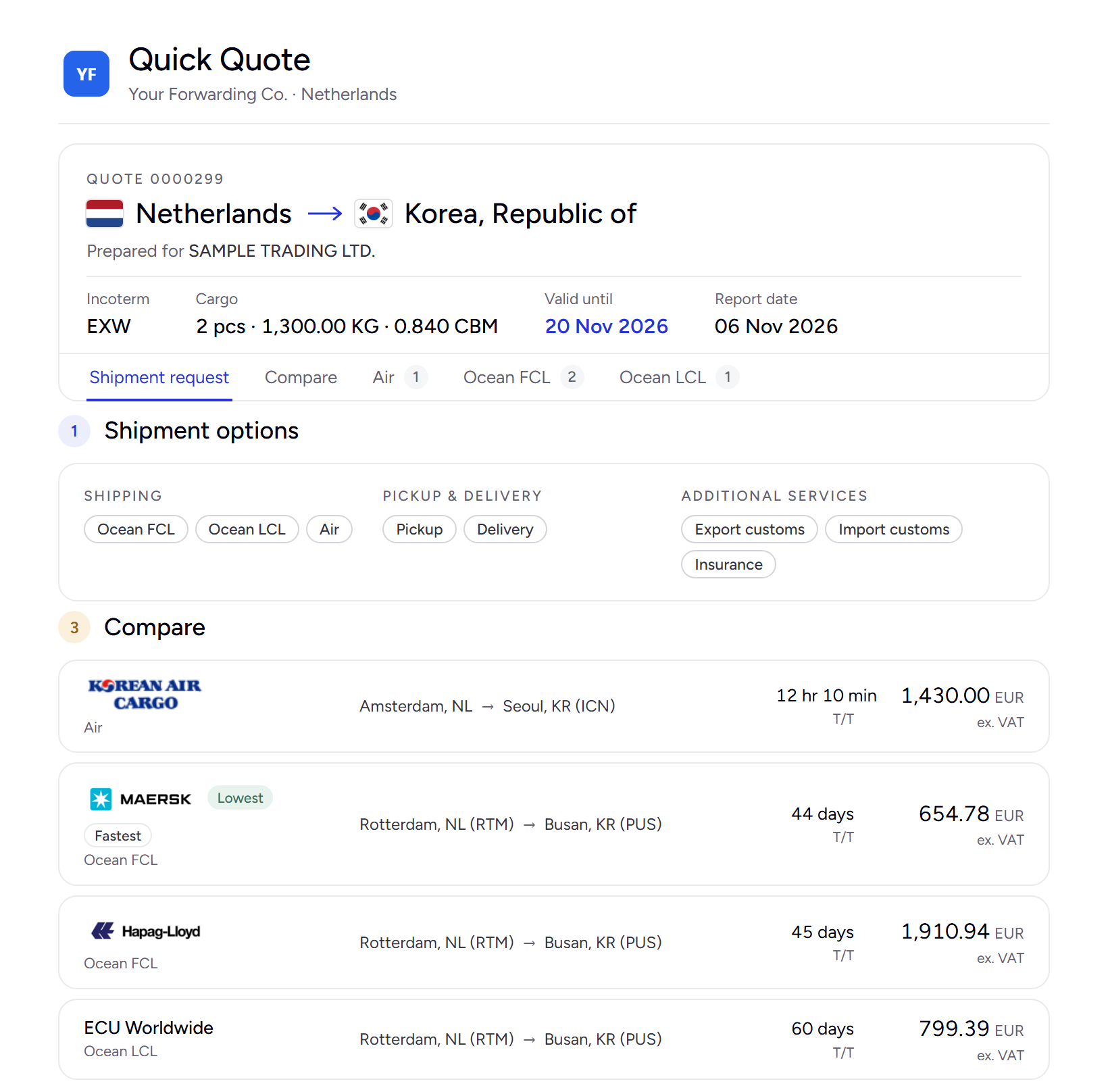
A complete offer, not a reminder

  • Your branded Quick Quote, prepared for the client
  • Their shipment request and the services door to door
  • All offers side by side, with transit time and price
  • The PDF attached and your e-mail signature
  • A valid-until date that moves with every send
Fromsales@your-company.comSubjectQuick Quote 0000299 · Netherlands → KoreaPDF · QuickQuote_0000299.pdf
The Quick Quote report the client receives: prepared for Sample Trading Ltd., Netherlands to Korea door to door, with Air, Ocean FCL and Ocean LCL offers compared by transit time and price
Pricing

Both sales-lead engines are in the ERP

Quote Auto Send
€95per user / month

Part of the User Licence, with every Quick Quote. No extra subscription, no charge per send.

Rate Publisher
€95per user / month

Part of the User Licence as well. See Rate Publisher →

Stop losing quotes to silence. Let every quote follow up itself.

× Something went wrong. Reload the page to carry on.

Rejoining the server...

Rejoin failed... trying again in seconds.

Failed to rejoin.
Please retry or reload the page.

The session has been paused by the server.

Failed to resume the session.
Please retry or reload the page.