Logistics ERP on Windows and in the browser

One licence. Your office PC and your tablet.

Every User Licence covers both the Logistics ERP desktop for Windows and the web app at app.logistics-erp.com. You use one login on the same screens, with the same company and the same data. The desktop is your office's workstation, and it runs the carrier checks and client e-mails while you work. The web app opens the ERP on any other device.

€95 per user / month, both includedSame screens on bothPasskey sign-in, no passwords
Desktop ERP · fetching carrier rates in the office
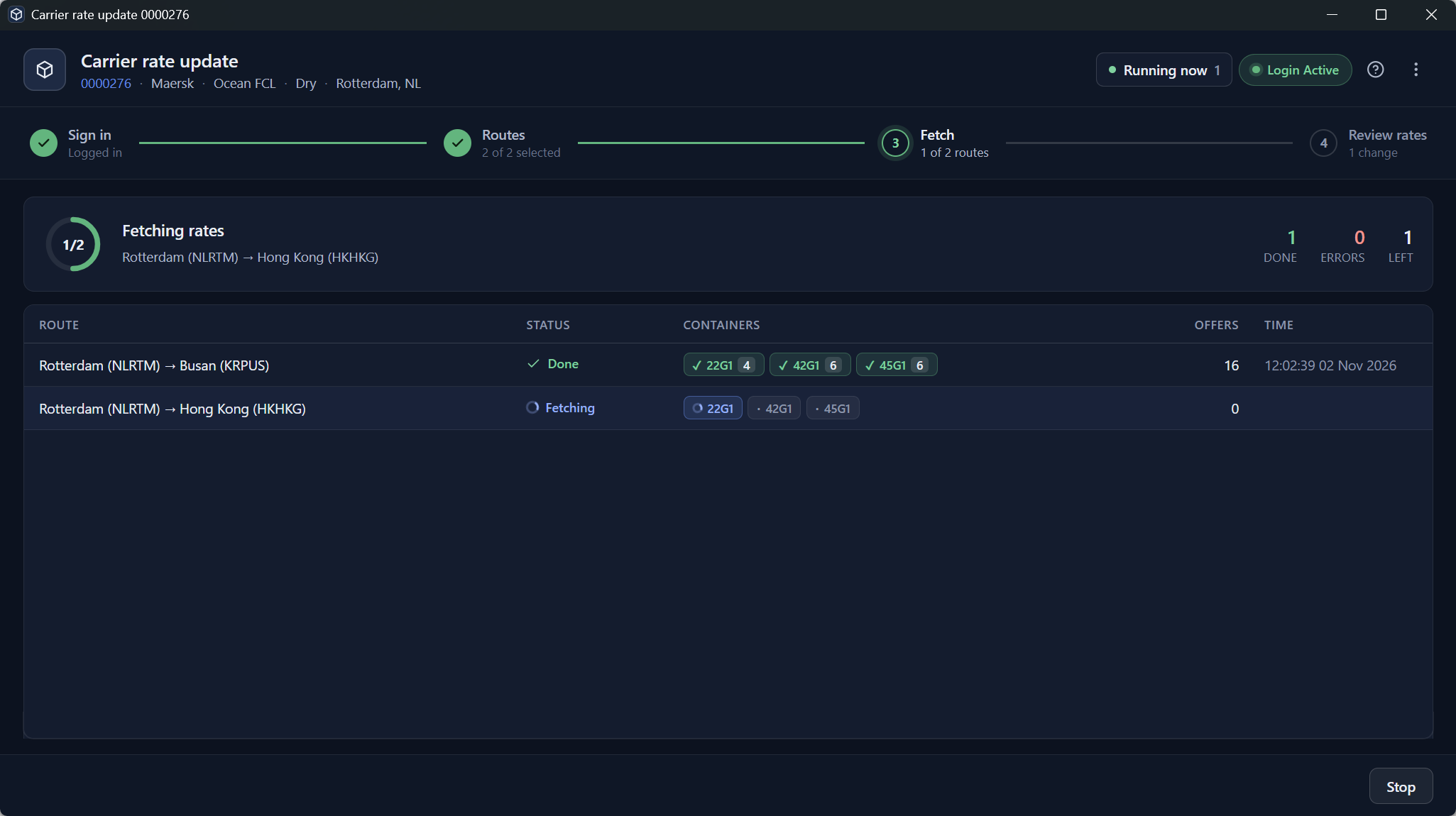
The desktop ERP's Carrier rate update window fetching Maersk rates from Rotterdam to Busan and Hong Kong
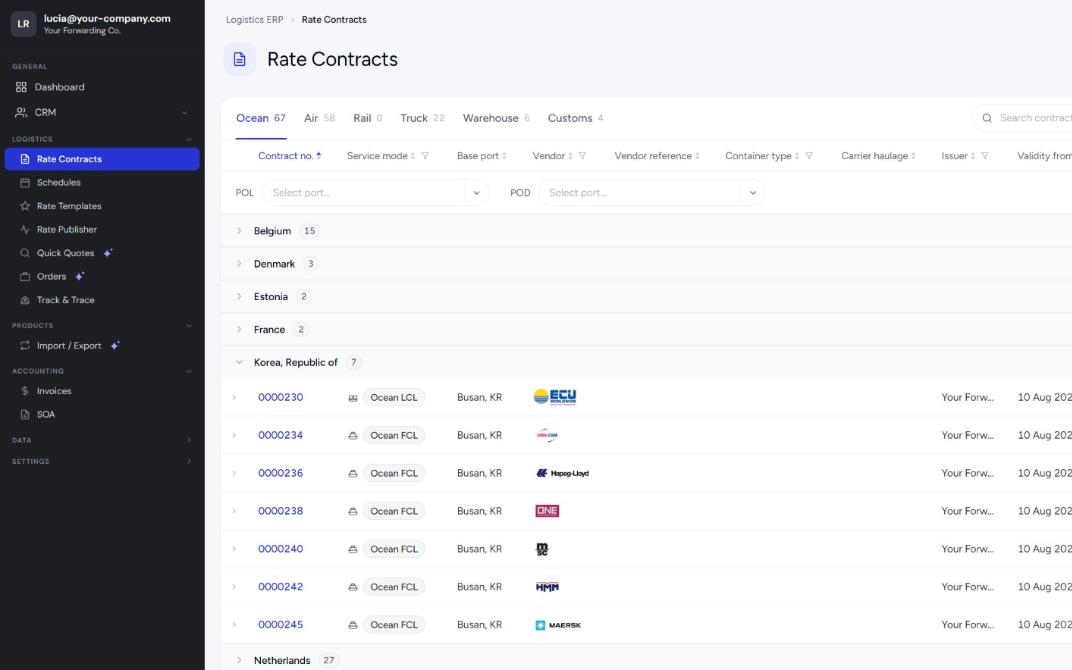
Web app · the same rates on a tablet
app.logistics-erp.com
The Rate Contracts list in the Logistics ERP web app: ocean contracts from Busan for ECU, CMA CGM, Hapag-Lloyd, ONE, MSC, HMM and Maersk
Two ways in, one licence

The desktop works for the office. The web app goes where you go.

You don't choose one or the other. Most teams run the desktop ERP on the operators' PCs and open the web app on everything else: a tablet, a Mac, a laptop at home or a colleague's PC.

Desktop ERP for Windows

The office workstation

The full ERP, installed on the PCs of your operators and back office. It has every module, and it is the part of Logistics ERP that works on its own: it fetches carrier data, checks shipments and sends clients their status on a schedule.

Who
Operators, customs and the back office: anyone who spends the working day in the ERP.
Where
A Windows PC in your office, with your company's carrier logins and your mailbox.
Only here
Carrier Data Fetcher, Track & Trace checks and Auto status, order status reports, Quote Auto Send, the E-mail module with its AI agents, your Outlook or Microsoft 365 mailbox and the Excel Add-in.
Web app · app.logistics-erp.com

The ERP on any other device

The same ERP screens in a browser, with nothing to install. It is useful on a tablet in a client meeting, a Mac, a laptop at home, or a PC in a second office where the desktop ERP isn't installed.

Who
Sales on the road, managers, people working from home, and operators away from their desk.
Where
Any modern browser: iPad and Android tablets, Mac, Chromebook, Windows or Linux.
What
Your rates and schedules, rate templates, Quick Quotes priced with your own rates, orders, licences, invoices, statements and tracked shipments.
One loginThe same passkey login on both, with no second account.
The same dataA rate, quote or order saved on the desktop is in the web app straight away.
The same screensThe web app runs the desktop's own pages, so there is nothing new to learn.
One priceBoth are in the User Licence, so a second device costs nothing extra.
The web app at work

The ERP where the desktop isn't installed.

Sign in at app.logistics-erp.com and the screens you know from the office open in the browser. Your company, your rates and your orders are the ones the desktop shows.

At a client's office

Open the client's quotes and orders, price a new Quick Quote with your own rates and send the quote report from your own mailbox, Microsoft 365 or your own mail server, before you leave.

On a tablet

In a meeting or on the warehouse floor, see an order's services and the milestones of a tracked shipment, with no laptop needed.

At home

Look up an order, an invoice or a client's statement of account in the evening, without a remote desktop or VPN.

On a Mac

The desktop ERP runs on Windows. Colleagues on a Mac or a Chromebook use the same ERP in their browser.

Only in the desktop ERP

The desktop is your office's engine.

Some work has to happen on a PC in your office. It reads carrier websites with your own logins, runs schedules through the day and sends e-mail from your operators' mailboxes. That is what the desktop ERP is for, and why these features live there.

01 · CARRIER DATA FETCHER

Carrier rates and schedules, fetched into your contracts

The desktop signs in to the carrier sites with your company's own logins and reads spot rates and vessel schedules route by route. You review the changes before they go into your rate contracts and schedules.

  • Ocean rates and vessel schedules from the biggest carriers, air rates through CargoGuide
  • Runs from your office connection, the way a person at your desk would
  • Every colleague sees the updated rates, in the web app too

Needs the Carrier Data Service: €350 per base country / month. How it works →

Carrier rate update in the desktop ERP: Maersk rates fetched from Rotterdam to Busan and Hong Kong
02 · TRACK & TRACE SCHEDULER

Shipments checked every hour, clients told at set times

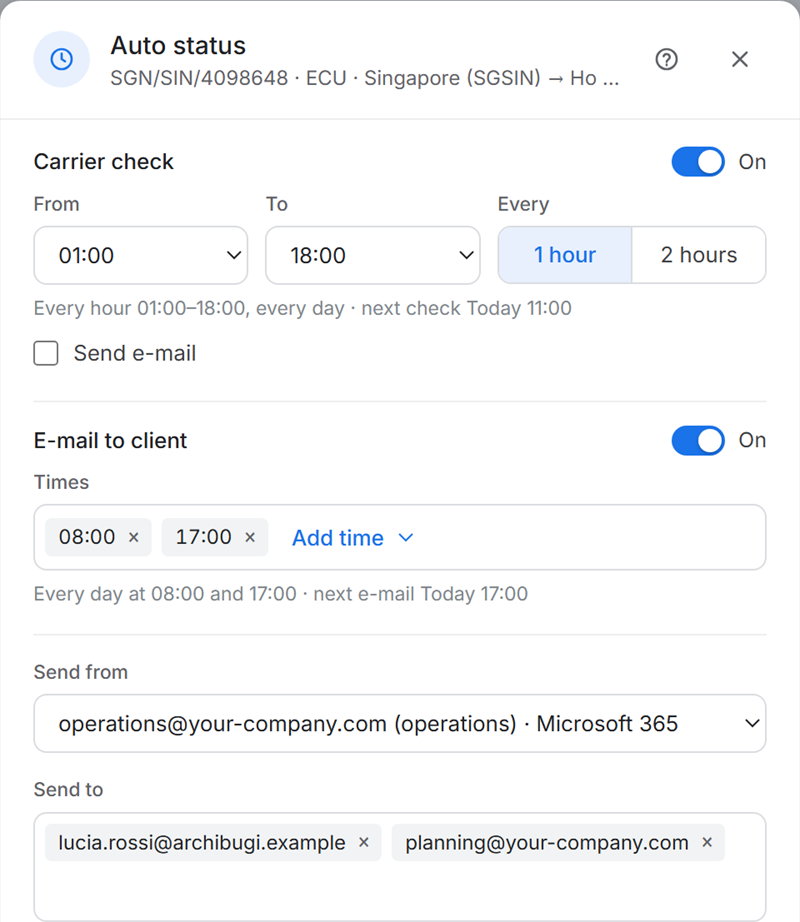
Auto status checks each tracked container, booking or air waybill with the carrier, every hour or two within the hours you set. At the times you choose it sends the client a status e-mail from your mailbox.

  • Nine ocean carriers, ECU Worldwide for LCL, 25 airlines and DHL Express
  • One operator's PC does the checking for the team
  • Everyone sees the latest status and ETA, in the web app too

Track & Trace in detail →

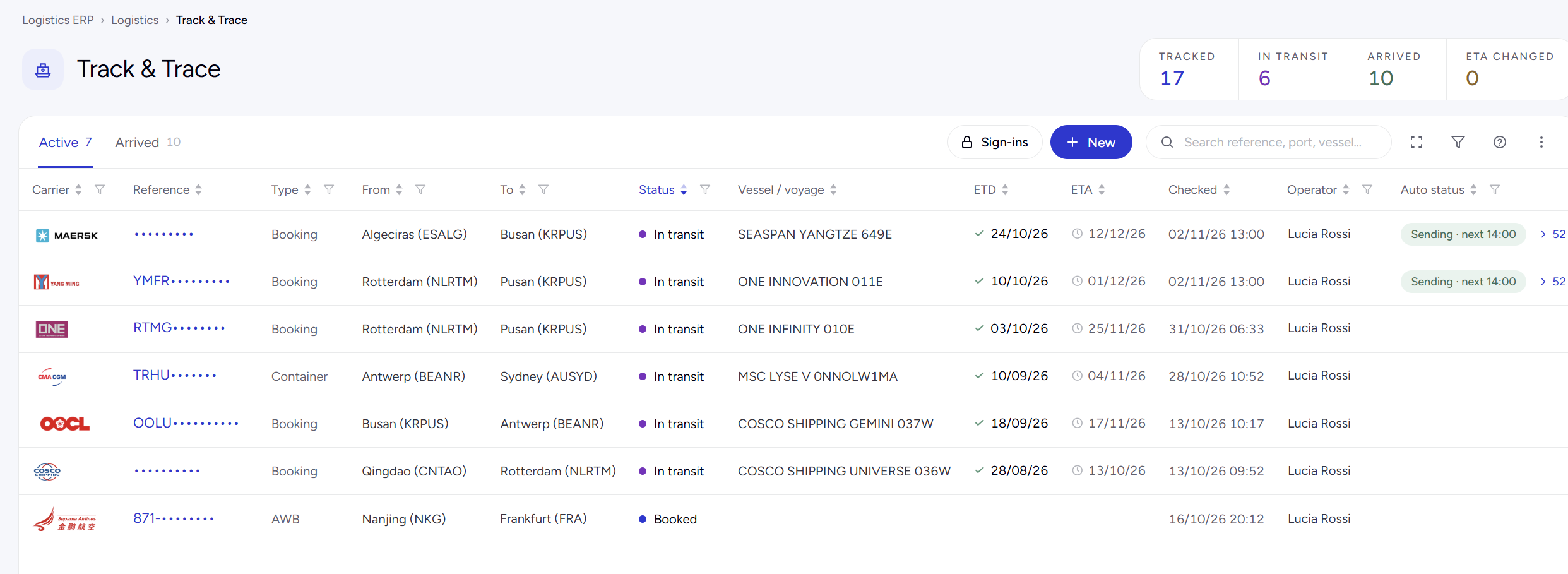
Track & Trace list: shipments in transit with Auto status sending at 14:00
Auto status settings: carrier check every hour from 01:00 to 18:00, e-mail to the client at 08:00 and 17:00
03 · ORDER STATUS REPORTS

The client's status report, sent without being asked

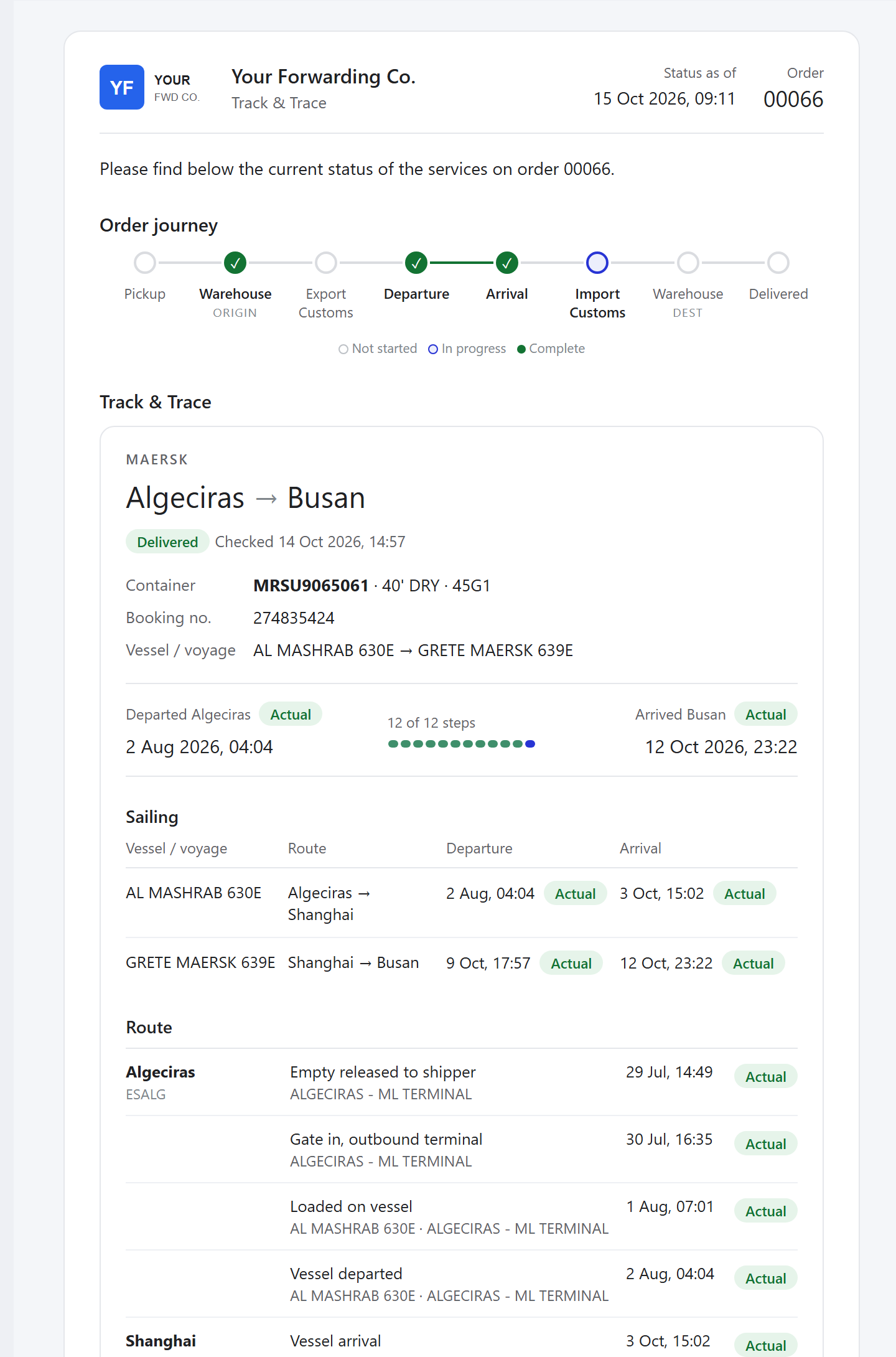
On an order, Auto status sends the client a report of every service at the times you choose: pickup, customs, departure, arrival and delivery, with the carrier's milestones under it. It goes out from the operator's own mailbox, so the client's replies come back to you.

  • Order journey across trucking, warehouse, customs and carrier
  • Live Track & Trace of the carrier service in the same e-mail
  • Sent at set times, so nobody has to remember

Order Flow →

Status e-mail to the client for order 00066: order journey and Maersk tracking from Algeciras to Busan
04 · QUOTE AUTO SEND

Each client's quote re-priced and sent again

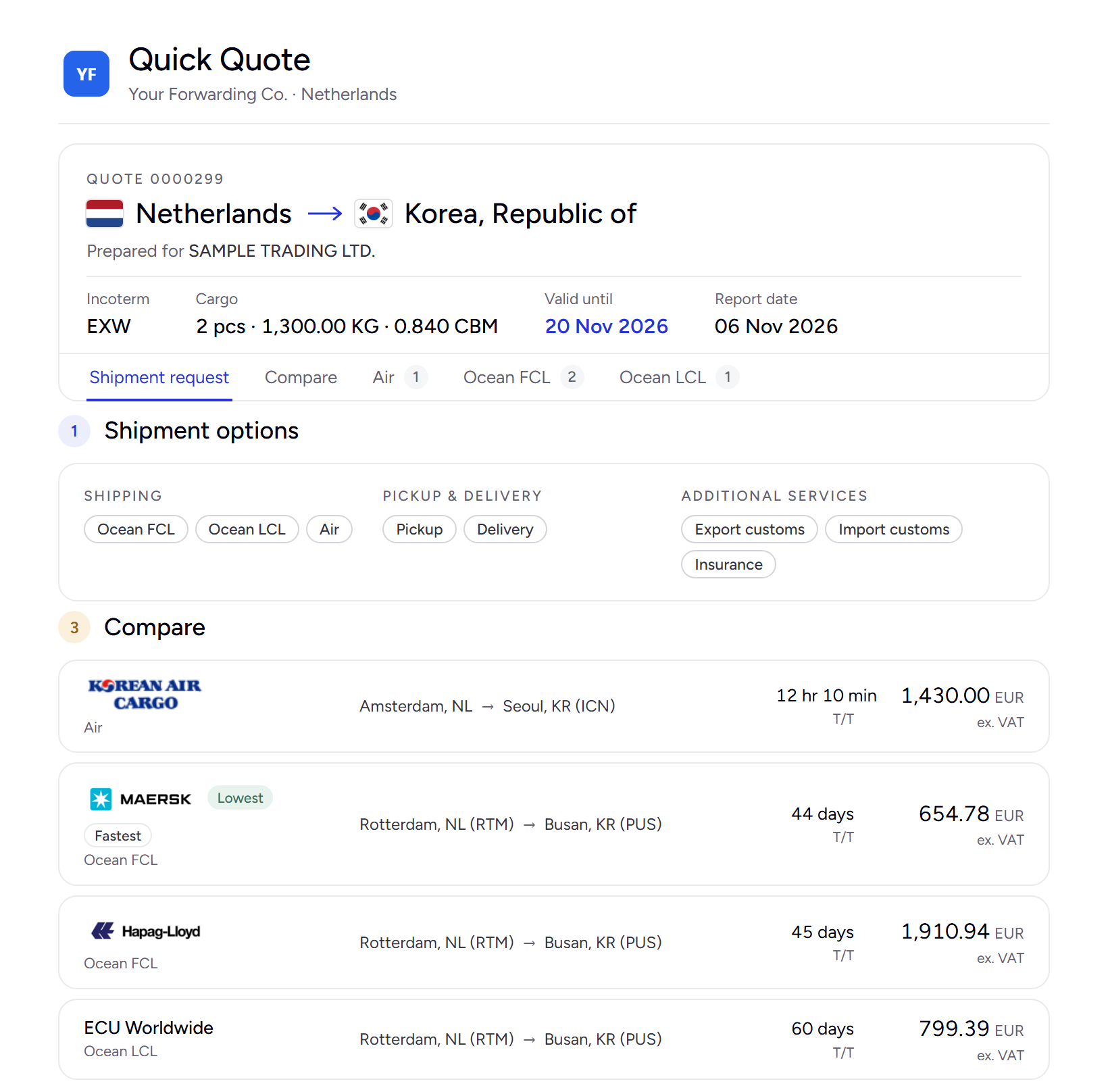
Quote Auto Send re-prices a client's own door-to-door quote with today's rates and sends it again daily, weekly or monthly, with a new valid-until date each time. It runs from the operator's PC and mailbox.

Quote Auto Send →

Quick Quote report sent to a client, priced per carrier
E-mail and AI agentsThe E-mail module reads client e-mails, turns a request into a priced Quick Quote and drafts the reply on an order.With AI Credits · AI Agents →
Outlook or Microsoft 365The ERP works with your Outlook or Microsoft 365 mailbox, so e-mails about an order or a licence stay with its ticket.Desktop ERP
Excel Add-inYour own Excel rate templates, priced live from the rates and margins in the ERP.Desktop ERP · Excel Add-in →
Why the desktop

A server in the cloud can't do this for you.

Carrier sites are made for people at a desk, not for servers. Many of them block traffic from data centres or ask a person to solve a check. Your office PC gets the same answers you would.

How a team works it

  1. 1Operators run the desktop ERP on their office PCs during the working day.
  2. 2The desktop fetches and sends: carrier rates, shipment checks, status e-mails and re-priced quotes, on schedule.
  3. 3Everyone sees the result. New rates, statuses and ETAs are in the shared data, on the desktop and in the web app.
Your own carrier loginsThe fetcher signs in at each carrier with your company's own account, from your PC, the way your team does by hand today.
Your office connectionCarrier sites see your office, as they see you every day, not an unknown data centre.
Your own mailboxStatus reports and quotes leave from the operator's mailbox, through Microsoft 365 or your own mail server. Replies come back to the operator.
A person at handWhen a carrier asks for a check, someone at the PC answers it and the run goes on.
Side by side

What you get where.

Both are in every User Licence. The desktop has everything; the web app has the screens you need away from your desk.

FeatureDesktop ERPWeb app
Your data, on any device
CRM: clients, contacts, sales leadsYesYes
Rate contracts, vessel schedules and rate templatesYesYes
Quick Quote, priced with your rates, and the quote report by e-mailYesYes
Orders, Import / Export licencesYesYes
Invoices and statements of accountYesYes
Tracked shipments: status, milestones, mapYesShows the desktop's checks
The office engine
Carrier Data Fetcher: rates and schedules from the carriersYesShows the fetched rates
Track & Trace carrier checks on a scheduleYesDesktop only
Auto status e-mails to clients (Track & Trace and orders)YesDesktop only
Quote Auto SendYesDesktop only
E-mail module with AI agents, your Outlook or Microsoft 365 mailboxYesDesktop only
Excel Add-inYesDesktop only
Getting started
Runs onWindows PCAny modern browser: tablet, Mac, Chromebook, PC
InstallInstaller from My accountNothing: app.logistics-erp.com
Sign inPasskey (Windows Hello)Passkey
IncludedSees the result of the desktop's workRuns on the desktop ERP only
Getting started

One login, a passkey on each device.

There are no passwords to share or forget. Each device gets a passkey once, with a setup code from your administrator.

1

Your administrator adds you

They add you under My account and buy your User Licence. Then they send you the setup e-mail: a one-time code and the download link for the desktop ERP.

2

Set up the desktop

Install the ERP on your office PC and enter the code. Windows Hello makes the passkey, and from then on you sign in with your face, finger or PIN.

3

Open the web app

On a tablet or another computer, go to app.logistics-erp.com and sign in with a passkey. A new device is set up once, the same way.

Price

Both are in the User Licence.

User Licence · per named user
€95per user / month
Desktop ERP for WindowsWeb app in any browserUpdates and support

One named user, on their office PC and in the browser. Billed monthly on a 12-month agreement, with a 14-day free trial.

Add for the company when you need them
  • Carrier Data ServiceThe fetcher on the desktop, per base country
    €350 / month
  • AI CreditsThe E-mail module's AI agents, 3,000 credits a month
    €50 / month
  • Client PortalYour clients quote, book and track online
    €250 / month

The full ERP in the office. The same ERP everywhere else.

× Something went wrong. Reload the page to carry on.

Rejoining the server...

Rejoin failed... trying again in seconds.

Failed to rejoin.
Please retry or reload the page.

The session has been paused by the server.

Failed to resume the session.
Please retry or reload the page.